Wired network
Employees should, as a general rule, be connected to the wired network (Ethernet) via cable from their docking monitor or docking station when in the office.
Self Help Advice for unstable wired network ( for students and employees)
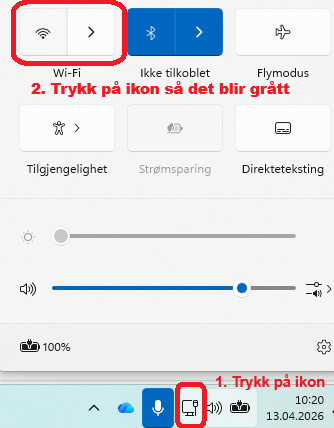
Turn off wireless network when you are connected to a wired network:
- Check Windows Update
- Contakte IT-vakt in Portalen
For employees: Additional advice for unstable wired network
- Check updates in Dell Command Update
- Try to connect the network cable directly into your PC instead of into your docking monitor.
If your PC lacks a network port:- Go to Portalen
- Click "Order new equipment"
- Select Ethernet-adapter
- Reason: I don't already have this type of equipment
Wireless network
Students, employees and guests with eduroam-affiliation can install eduroam.
VPN
Connect to HiØ's local network from home or while traveling.
eduVPN
eduVPN is a VPN service for "UH-sektoren" (higher education institutions), and gives access to a large number of UH Services when you are "off campus".
Guest
Use our self-service solution to connect to our guest internet HIOF-GUEST.