Installing Cisco VPN on Private machines
To login to Cisco VPN on a private computer Cisco Secure Client must be installed.
If you do not already have Cisco Secure Client, you can download from our Cisco VPN Server.
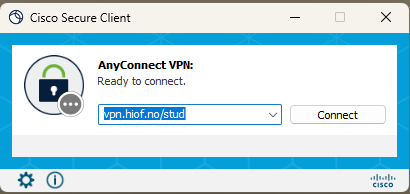
VPN adress: vpn.hiof.no/stud
Logging in to Cisco VPN
When logging in to Cisco VPN, start Cisco Secure Client and enter vpn.hiof.no/stud in the connect field if missing.
Click Connect, then enter yourUsername@hiof.no, your password and confirm with multi factor authentication (Microsoft Authenticator).
For iPad and iOS devices
To install Cisco VPN on an iOS device, please download and install Cisco Secure Client from AppleStore.
Cisco VPN for Chromebook and ChromeOS devices
To install Cisco VPN on a ChromeOS device,please download and install Cisco Secure Client from Google Play.